Category: Uncategorized
03/12: Report Meetings
No scheduled class meeting today. I’ll be meeting with everyone individually to talk about your technical reports. The meeting schedule will be posted on Canvas.
03/10: Report Meetings
No scheduled class meeting today. I’ll be meeting with everyone individually to talk about your technical reports. The meeting schedule will be posted on Canvas.
03/08: Report Meetings
No scheduled class meeting today. I’ll be meeting with everyone individually to talk about your technical reports. The meeting schedule will be posted on Canvas.
03/05: Technical Report: Rough Peer Review
If you have not already, please sign up for a time slot to talk one on one next week about your draft. These meetings take about 20-30 minutes, but I’m letting everyone reserve the full hour in case we go long (or, more realistically, in case you have a class that runs into that hour).
| Mon | Tue | Wed | Thur | Fri |
| Dylon Y | 8-9am | 8-9am | 8-9am | Tentative: Mariko |
| Liam B | 9-10am | 9-10am | In class 9am-10am | Alison M |
| In class 10-11am | 10-11am | In class 10-11am | Ben A | In class 10-11am |
| Office hours 11am-Noon | Office hours 11am-Noon | Office hours 11am-Noon | Office hours 11am-Noon | Office hours 11am-Noon |
| Jessica E | In class 12:30-2pm | Noon – 1pm: Zach N | In class 12:30-2pm | Landon M |
| Kela L | In class 12:30-2pm | 1-2pm: Paula H | In class 12:30-2pm | Nick F |
| 2-3pm: Jake W | 2-3pm: Adam N | 2pm: Emma C Meeting starting at 2:30 | Meeting 2pm-3pm | Meeting 2pm-3pm |
| 3-4pm | 3-4pm | 3-4pm | 3-4pm: Mariko B | Class 3pm-5pm |
| 4-5pm | Kirsten R | 4-5pm | 4-5pm: McKenna S | Class 3pm-5pm |
Please bring the current draft of your technical report to class today. We will work through a few peer review exercises.
I assume you will be reviewing each other’s work in Microsoft Word or in an Open Office Writer product. In Word, you can find Track Changes and Comment tools underneath the Review tab. In Open Office, you will find Track Changes under the Edit menu (Edit > Changes > Record) and Comments under the Insert menu (Insert > Comment).
Before we start, if you’re working on Zoom, please make sure your document is saved in your OneDrive folder. If you’re working from office.com, you can click the context menu (three vertical dots), then click “Share” to get a link to send to your peer.
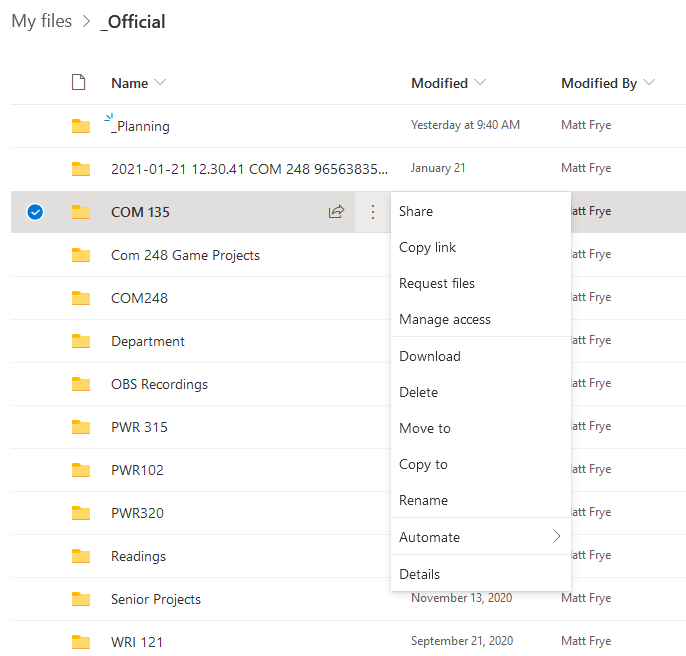
If you are using OneDrive on your computer, simply right click the file you want to share, then click the “Share” option.
Your peer will be able to view this file, unless you set the permissions to allow editing.
If you are nearly complete, you’ll work with folks in a similar stage to double-check and finalize your report before turning it in.
If you’re still in the middle, you’ll work with folks also generating content. The peer review and discussion here will focus on figuring out where your conversations need to go to make a successful report.
If you’re still at the outline stage, you’ll work with folks in the same situation. The peer review here will focus on planning and getting content “blocks” set in place to draft as quickly and effectively as possible.
At the end of this peer review process, you’ve got options for what you want to do with your rough draft.
- Turn it in right away (peer review notes intact) and take the weekend off.
- Address some or all of your peer’s notes, then turn it in today or later this weekend.
- Address as much as you can of your peer’s notes, then turn it in at least one day before we meet (see schedule below).
The schedule below covers next week. The buttons just open an email window to reserve that time slot, similar to what we did with the Tech Writing Presentations. I’ll keep checking my email as often as possible over the next few days to keep this list updated.
These meetings tend to last 20-30 minutes, but I’m giving everyone a full one-hour block (a) in case we go long and (b) in case you’ve got something else scheduled that overlaps with that time. We’ll use the class Zoom meeting link for these.
03/03: Technical Report: Drafting Day
Attendance today is optional. We will spend the full 50 minutes drafting. I’ll be here as a resource to help with any questions. I’ll also talk through a few little tools and techniques I use to write my own reports that might be useful to you.
03/01: Technical Report: Maintaining Focus (+Word Commenting)
Assigned Today
We’re in the closing run of the course. Your Technical Report rough draft is due on March 5.
Today’s Content
We will likely spend part of today drafting, but before we get there, we’ll recap what we’ve learned about document focus and talk about techniques for maintaining it in a document.
Because one of the biggest detractors from focus in technical writing is our inability to sit down and write a full document in one sitting (maybe you can do it as a student, but it becomes less possible as time goes on), we will talk about techniques for signposting within our text to effectively tell our audience (and ourselves, during drafting and revision) what our document is doing. We will also talk about uses of the Comment tool and Track Changes in most word processors to keep track of what we’re trying to get done while we’re writing, particularly when we can’t write a document linearly from beginning to end.
02/26: Technical Report: Talking About Data (+Word Custom Styles)
Assigned Today
We’re in the closing run of the course. Your Technical Report rough draft is due on March 5.
Today’s Content
We will come back to some of our structure conversations from earlier this term and the ways we can talk about data. We will work on some techniques for planning ahead if we haven’t finished collecting or analyzing data yet.
One useful tool we have available in many word processors is Custom Styles. We will talk through the process for setting up and using these styles, and some specific uses we can get out of that.
02/24: Technical Report: Organizing Information (+Word Headings, Index)
Assigned Today
We’re in the closing run of the course. Your Technical Report rough draft is due on March 5.
Today’s Content
We’ll recap a lot of conversations we’ve had about structure and organization throughout the term. We will talk about some techniques we can use to organize our data and discussions to make the most impact on our reader.
We will also get into some word processor tools to support this during our drafting: specifically, we will look at Heading styles, Indices and Cross-References. This is most useful if you are working on your report in Word.
02/22: Technical Report: Sorting Information (+Word Reference Manager)
Assigned Today
We’re in the closing run of the course. Your Technical Report rough draft is due on March 5.
Today’s Content
We’ll talk about some techniques for putting our information in one place, using a previous technical memo and the tools we have available.
One major part of today’s conversation will be the Microsoft Word Reference Manager and some ways to use it really effectively.
